*Updated: June 2026*
*Author: Carefree Support*
The On-Call Roster determines who receives alarm notifications and at which escalation level. Before configuring the roster, make sure all team members are already added in [[User Management]] and have contact information (email and/or SMS) on their accounts.
For a full explanation of the three-level escalation pipeline, see [[Alarm Notification and On-Call Roster]].
1. From the left sidebar, click **Manage Team**.
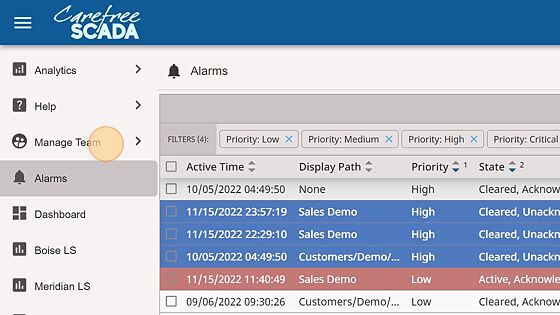
2. Click **User Management** to confirm all team members are in the system.

3. Once you have confirmed all users are present, click **On-Call Roster**.

4. The roster shows your full user list along with the contact methods available for each person. An envelope icon indicates an email is configured; a message bubble indicates an SMS number is configured. Contact information can be managed from the [[User Management]] page.

5. Select a user from the left list, then use the arrow controls to place them into the **Initial Call List**. Users in the Initial list are notified immediately when a Callout alarm becomes active. They have 5 minutes to acknowledge the alarm before it escalates to the Backup list.

6. Select another user to place in the **Backup Call List**. If no one in the Initial list acknowledges within 5 minutes, all Backup list members are notified simultaneously. They then have an additional 5 minutes before the alarm escalates to the Administrative list.

7. The **Administrative Call List** is the final escalation level. If neither the Initial nor Backup lists have acknowledged the alarm after 10 minutes, the Administrative list is notified. The Administrative list also receives acknowledgment notifications when any alarm is acknowledged — useful for supervisors tracking response activity.

---
*For help configuring your on-call roster, contact Carefree Support at
[email protected] or call (208) 362-5858.*
*© 2026 Advanced Control Systems, LLC. CarefreeSCADA is a trademark of Advanced Control Systems.*